
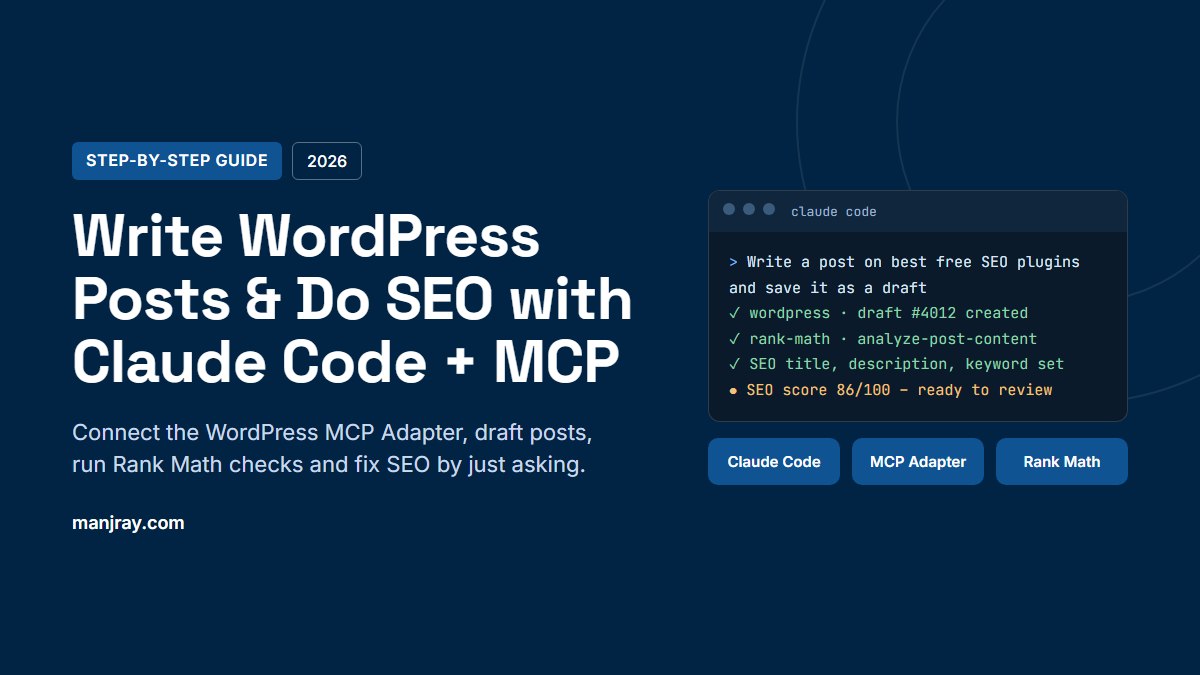
Writing a blog post, then filling in the SEO title, meta description, focus keyword, slug, alt text and internal links, can take an hour or more. With a Claude Code WordPress MCP setup, you describe the post in plain English and Claude does the work: it reads your Search Console keywords, writes the post, creates the draft in WordPress, runs Rank Math’s on-page SEO tests and fixes what fails.
In this guide I’ll show you the exact workflow I use on manjray.com, step by step, with a screenshot for every step. If you haven’t connected Claude Code to WordPress yet, start with my guide to connecting Claude Code to WordPress. Step 1 below is a short recap.
Table of Contents
What You Can Do with Claude Code WordPress MCP
| Task | How Claude does it | Time |
|---|---|---|
| Find a post topic from real keyword data | Rank Math ability get-top-keywords (Search Console) | 1 minute |
| Write a full post with headings, table and FAQ | Writes an HTML file in your project folder | 2–4 minutes |
| Create the draft, category and featured image | WordPress REST API with your application password | 1 minute |
| Run on-page SEO tests | Rank Math ability analyze-post-content | 1 minute |
| Set SEO title, description and focus keyword | Rank Math updateMeta endpoint | 1 minute |
| Audit the whole site | audit-site-seo, get-seo-scores, get-link-report | 2 minutes |
What You Need Before You Start
- The Claude desktop app with the Code tab (or Claude Code in a terminal)
- A WordPress site on version 6.9 or newer, where the Abilities API is built in
- The official WordPress MCP Adapter plugin, installed and active
- A recent version of Rank Math SEO. It registers its SEO tools as abilities that Claude can use. Connect Search Console in Rank Math if you want keyword data.
- An application password for an Administrator or Editor account (Users → Profile → Application Passwords)
- Node.js 20+ on your computer, and a fresh site backup
Step 1: Connect the WordPress MCP Server to Claude Code
Open a terminal and add your site as an MCP server. Replace the URL, username and application password with your own:
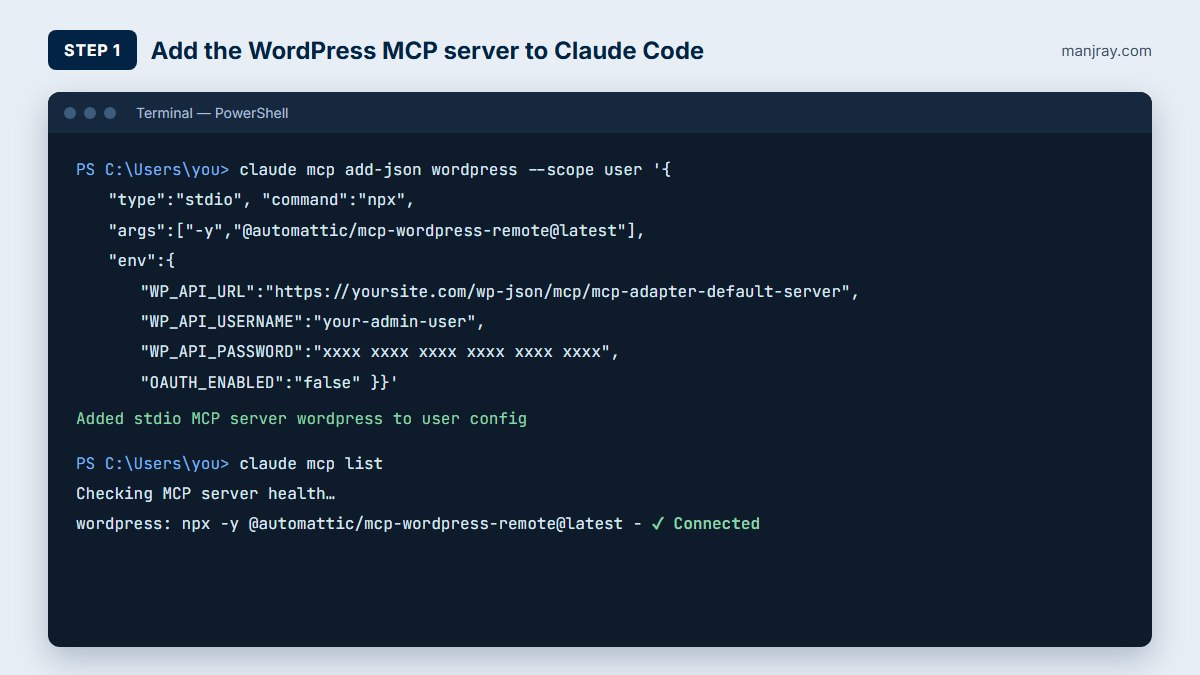
claude mcp add-json wordpress --scope user '{"type":"stdio","command":"npx","args":["-y","@automattic/mcp-wordpress-remote@latest"],"env":{"WP_API_URL":"https://yoursite.com/wp-json/mcp/mcp-adapter-default-server","WP_API_USERNAME":"your-admin-user","WP_API_PASSWORD":"xxxx xxxx xxxx xxxx xxxx xxxx","OAUTH_ENABLED":"false"}}'Then run claude mcp list. You should see wordpress: ✓ Connected. Start a new session in the Code tab so the server loads.
Claude will also use the WordPress REST API to create posts, so save the same login as two environment variables. In PowerShell:
setx WP_USER "your-admin-user"
setx WP_APP_PASSWORD "xxxx xxxx xxxx xxxx xxxx xxxx"
Restart the Claude app after setx so it picks up the new variables. This keeps the password out of your chat and out of your project files.
Step 2: Check Which WordPress Abilities Claude Can Use
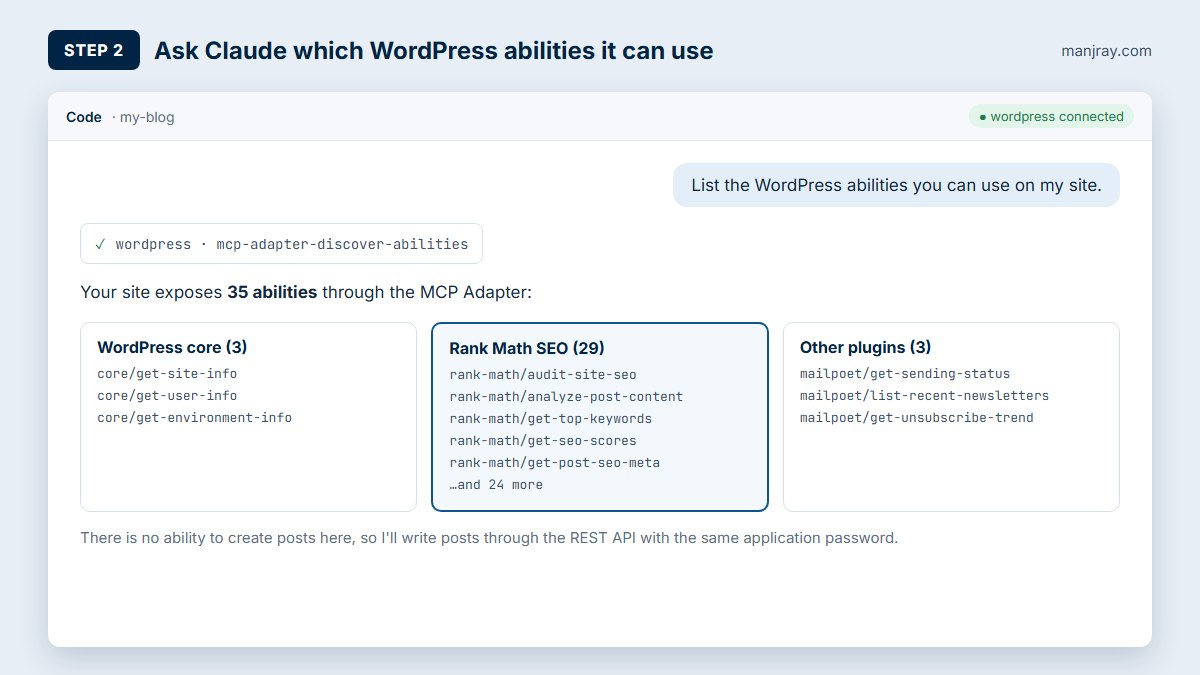
The MCP Adapter only gives Claude the abilities your site registers. WordPress core adds a few, and plugins like Rank Math add more. In the Code tab, type:
List the WordPress abilities you can use on my site.
On my site Claude found 35 abilities: 3 from WordPress core, 29 from Rank Math and 3 from MailPoet. Rank Math’s abilities are the SEO toolbox for this whole guide.
Important: the MCP Adapter alone has no ability to create or edit posts. That’s fine. Claude Code can also run commands, so it creates posts through the normal WordPress REST API with the same application password. MCP handles the SEO intelligence, and the REST API does the writing.
Step 3: Find a Post Topic from Your Search Console Keywords
Don’t guess what to write. Ask Claude to look at your real search data:
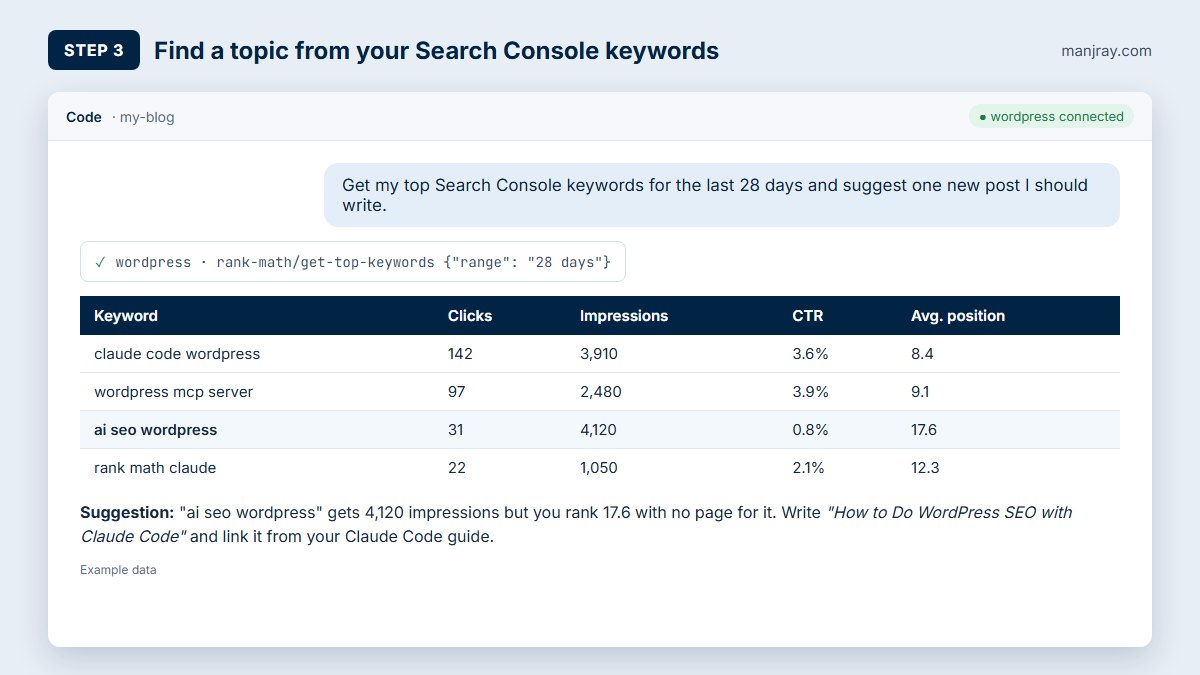
Get my top Search Console keywords for the last 28 days and suggest one new post I should write.
Claude calls Rank Math’s get-top-keywords ability and looks for keywords with many impressions but a weak position and no dedicated page. Those are your easiest wins. Pick the topic and the focus keyword before moving on.
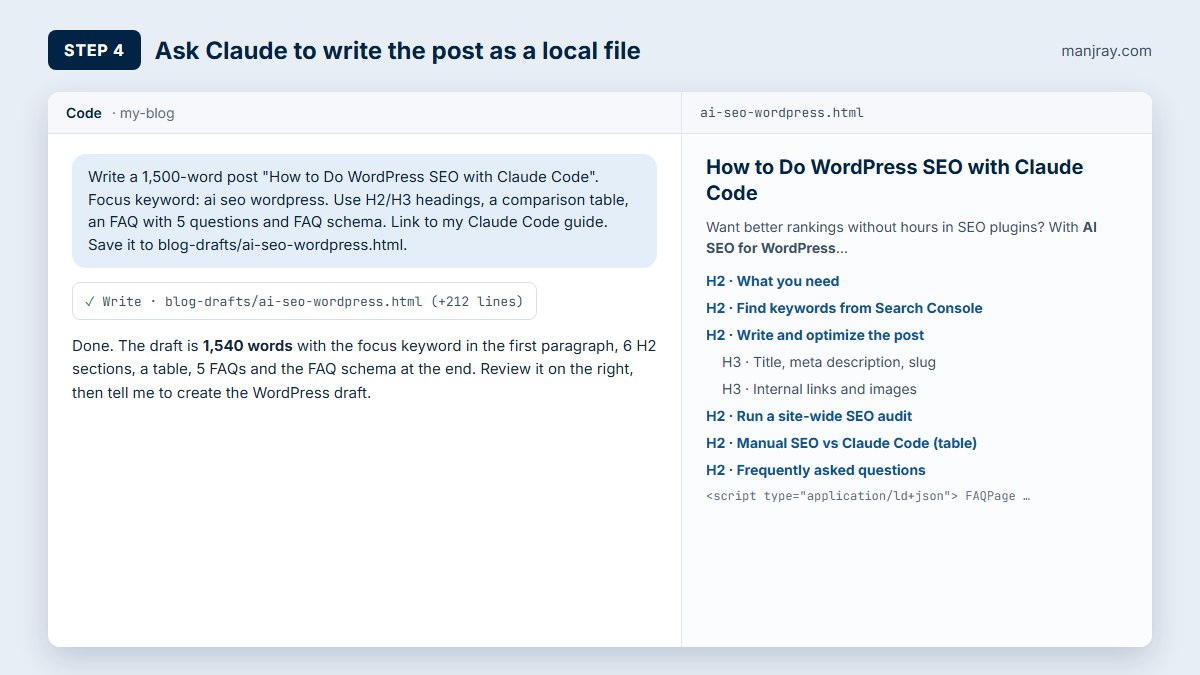
Step 4: Ask Claude to Write the Post
Give Claude a clear brief: title, focus keyword, length, structure and where to save the file. For example:
Write a 1,500-word post “How to Do WordPress SEO with Claude Code”. Focus keyword: ai seo wordpress. Use H2/H3 headings, a comparison table, an FAQ with 5 questions and FAQ schema. Link to my Claude Code guide. Save it to blog-drafts/ai-seo-wordpress.html.
Claude writes the post as an HTML file in your project folder, so you can read it and ask for changes before anything touches your site. Ask for edits in plain English, such as “make the intro shorter” or “add a section on internal links”.
Tip: save your site rules in a CLAUDE.md file in the project folder: brand colors, categories, affiliate link rules, tone of voice, and “always save as draft”. Claude reads it in every session, so every post follows the same rules without you repeating them.
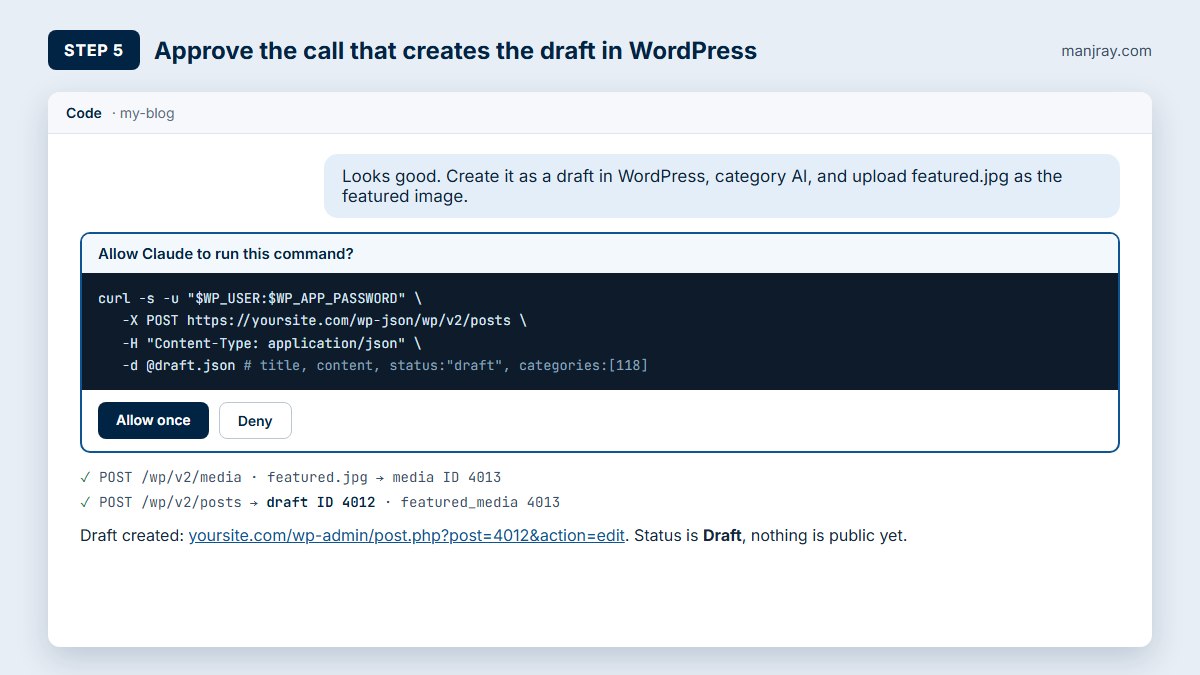
Step 5: Create the Draft in WordPress
When the post looks good, tell Claude:
Looks good. Create it as a draft in WordPress, category AI, and upload featured.jpg as the featured image.
Claude uploads the image to /wp-json/wp/v2/media, then creates the post at /wp-json/wp/v2/posts with "status": "draft". Claude Code asks for your approval before it runs each command. Read the command, then click Allow. Claude replies with the draft’s ID and edit link.
Need a featured image? Ask Claude to design one in Claude Design at 1200×675 with your brand colors, then upload it in the same step.
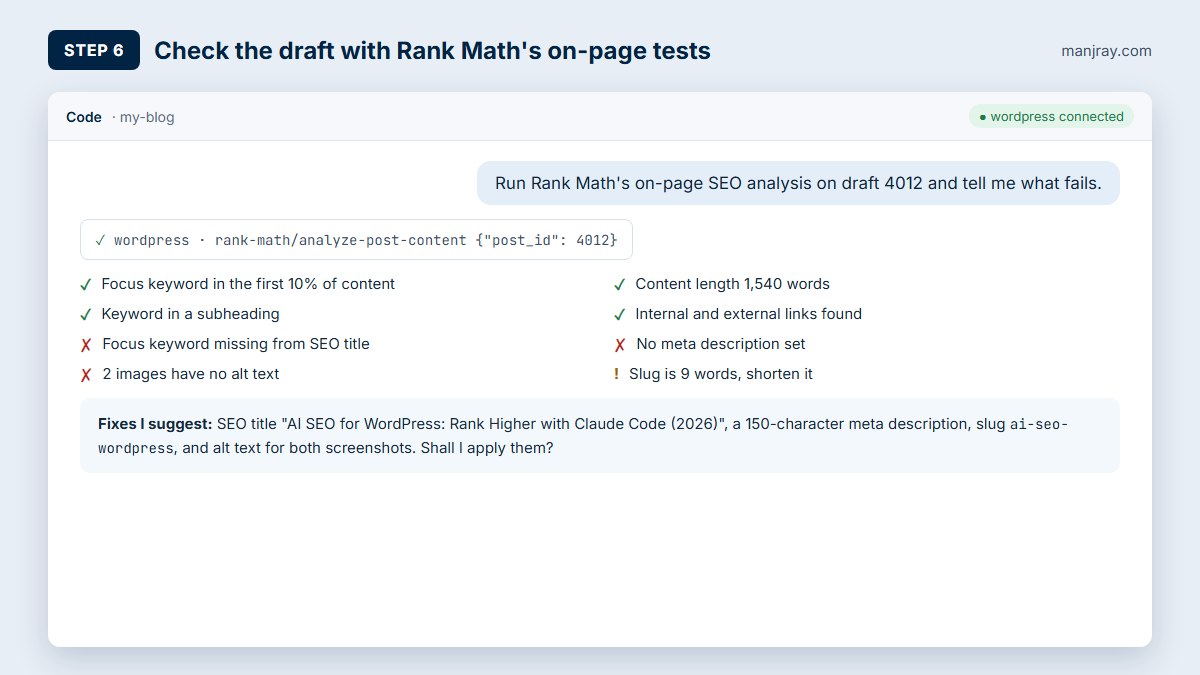
Step 6: Run Rank Math’s On-Page SEO Analysis
Now check the draft the same way Rank Math does in the editor:
Run Rank Math’s on-page SEO analysis on draft 4012 and tell me what fails.
The analyze-post-content ability returns the post’s content, headings, images, links and the list of Rank Math tests. Claude checks each test and tells you what passes, what fails and how to fix it, for example a missing meta description, no keyword in the SEO title, images without alt text or a slug that is too long.
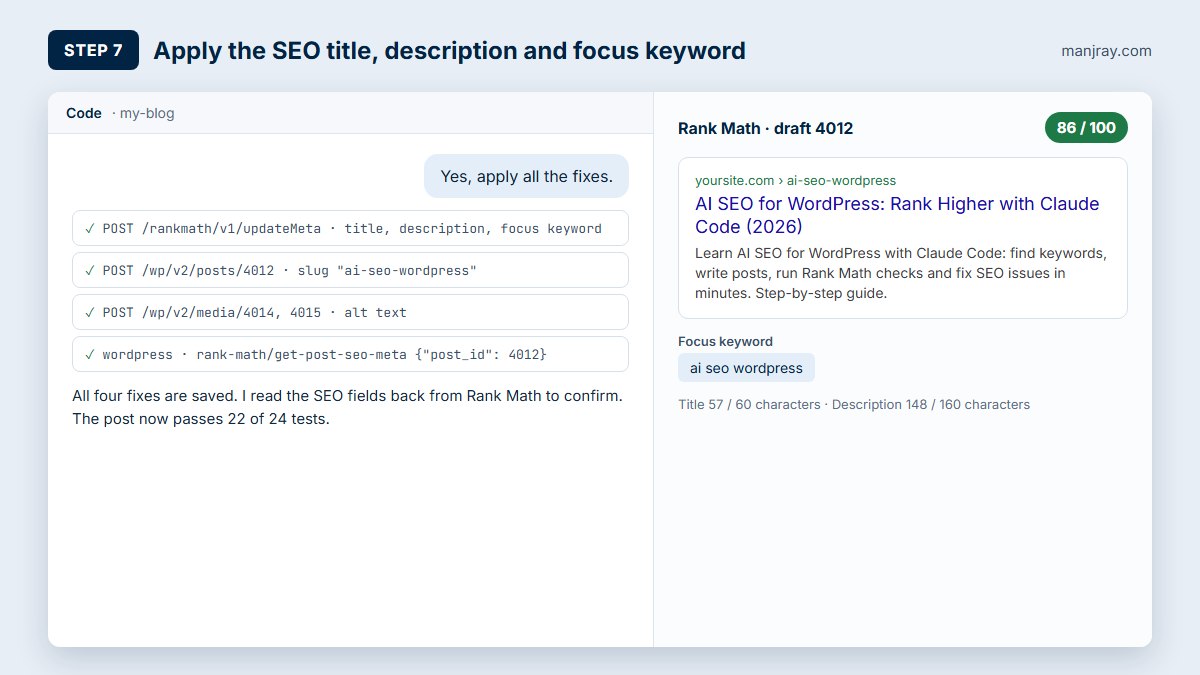
Step 7: Set the SEO Title, Meta Description and Focus Keyword
Reply “Yes, apply all the fixes.” Claude then:
- Saves the SEO title, meta description and focus keyword through Rank Math’s
/wp-json/rankmath/v1/updateMetaendpoint (fieldsrank_math_title,rank_math_descriptionandrank_math_focus_keyword) - Shortens the slug with the posts endpoint
- Adds alt text to each image through the media endpoint
- Reads the values back with the
get-post-seo-metaability to confirm they were saved
Keep the SEO title under 60 characters and the meta description under 160, with the focus keyword near the start of both.
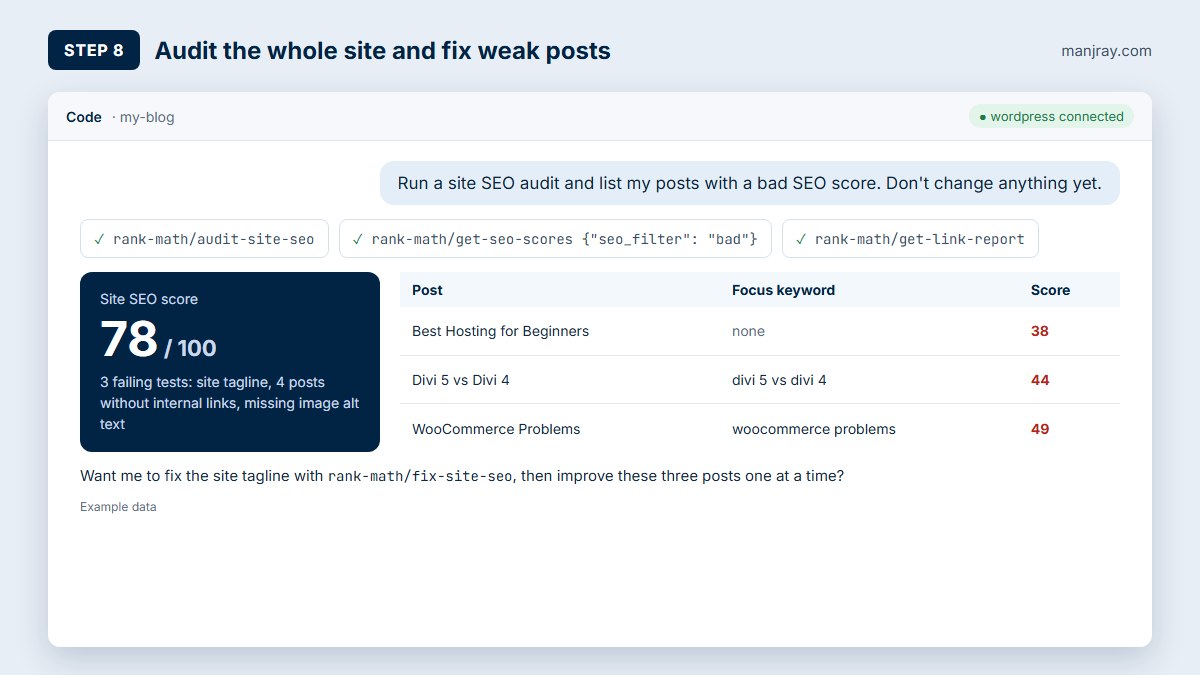
Step 8: Audit Your Whole Site and Fix Weak Posts
The same connection works for your old content too. Ask:
Run a site SEO audit and list my posts with a bad SEO score. Don’t change anything yet.
Claude runs audit-site-seo for the site-wide score, get-seo-scores with the “bad” filter for weak posts, and get-link-report for posts with no internal links. Some site-wide issues, like a missing tagline, can be fixed with fix-site-seo. Then improve weak posts one at a time with Steps 6 and 7.
Step 9: Review the Draft and Publish It Yourself
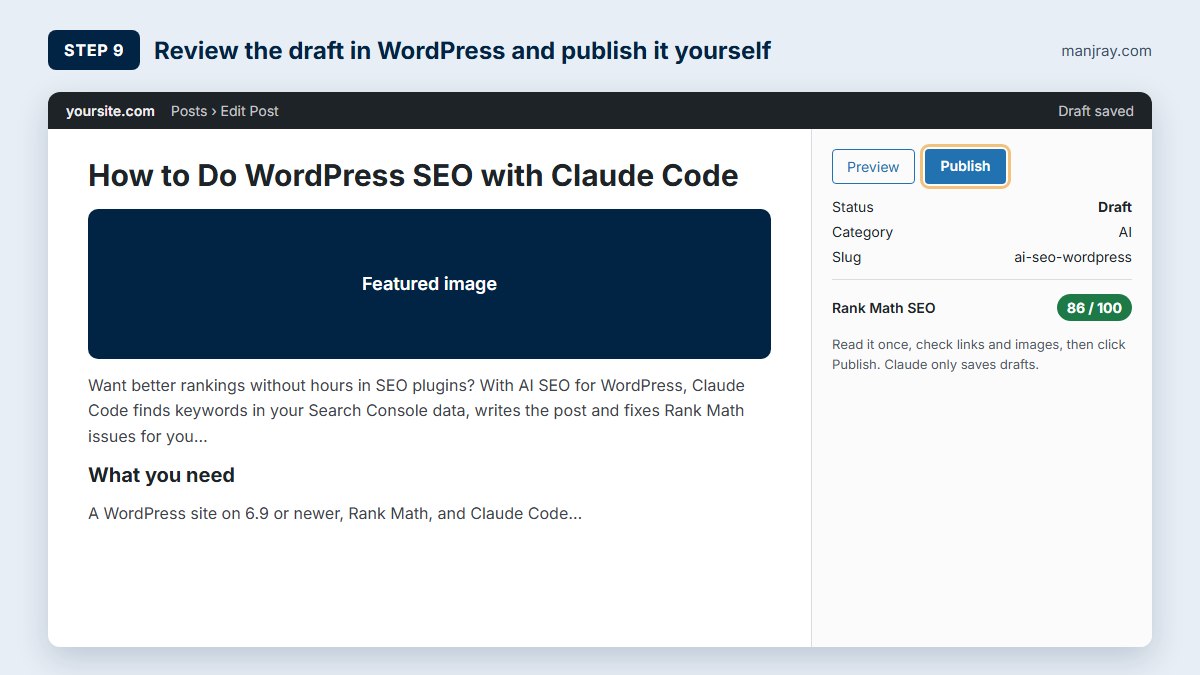
Open the draft in wp-admin. Read it once, click every link, check the images on mobile with Preview, and make sure the Rank Math score looks right. Then click Publish. I recommend keeping this last click for yourself: Claude saves drafts, you decide what goes live.
Copy-Paste Prompts for Posts and SEO
| Task | Prompt |
|---|---|
| Topic ideas | “Find keywords where I rank 8–20 with over 1,000 impressions and no dedicated post.” |
| New post | “Write a 1,500-word post on [topic], focus keyword [keyword], with a table, 5 FAQs and FAQ schema. Save it as a draft in category [name].” |
| Update an old post | “Update post [ID] for 2026: refresh prices and dates, fix broken links, keep everything else. Save as a new draft revision.” |
| On-page SEO | “Run analyze-post-content on post [ID] and fix every failing test.” |
| Missing keywords | “List posts with no focus keyword and suggest one for each. Don’t save until I approve.” |
| Internal links | “Find posts with no internal links and suggest 2 relevant links for each.” |
| Technical check | “Show my sitemap status, robots.txt and the top 404 errors.” |
Troubleshooting
| Problem | Fix |
|---|---|
| No Rank Math abilities in Step 2 | Update Rank Math to the latest version and make sure the MCP Adapter plugin is active. |
get-top-keywords returns nothing | Connect Google Search Console in Rank Math → Analytics and wait for data to sync. |
401 when creating a post | Check WP_USER and WP_APP_PASSWORD, restart the app after setx, and allow REST API logins in your security plugin. |
HPE_INVALID_CHUNK_SIZE | Your cache or CDN changes the response. Exclude /wp-json/mcp/* from LiteSpeed Cache and Cloudflare caching. |
| Inline CSS in the post breaks | Ask Claude to use inline styles on elements instead of a <style> block, or keep the CSS on one line. |
Safety Tips
- Always save as draft. Put “never publish, only save drafts” in your
CLAUDE.md. - Approve each command on a live site, and read what it will change.
- Use a separate application password for Claude and revoke it from Users → Profile if it leaks.
- Back up before bulk changes, such as updating many old posts at once.
- Check facts yourself. Claude writes well, but prices, dates and product details need your review.
Frequently Asked Questions
Can Claude Code create WordPress posts through MCP?
The official WordPress MCP Adapter only exposes the abilities your site registers, and core WordPress does not register a create-post ability. Claude Code creates the post through the WordPress REST API with the same application password, and uses MCP abilities such as Rank Math’s for SEO checks.
Does this work with Rank Math?
Yes. Recent versions of Rank Math register about 29 abilities, including keyword data from Search Console, on-page SEO analysis, site audits, SEO scores and link reports, and Claude Code can use all of them through the MCP Adapter.
Does it work with other SEO plugins like Yoast?
Yes for writing and creating posts. For the SEO tools, ask Claude to list your abilities: if your SEO plugin does not register abilities, Claude can still check titles, descriptions, headings and links itself, but you will not get plugin features like Rank Math site audits or Search Console keywords.
Is it safe to let Claude edit my live site?
Yes, if you use an application password, approve each command, save everything as a draft and publish it yourself. Keep a recent backup before bulk changes.
Do I need to know how to code?
No. You run one command to connect the MCP server and two to save your login. After that you give Claude instructions in plain English.
Final Thoughts
A Claude Code WordPress MCP workflow turns a full post, from keyword research to a draft with a high Rank Math score, into a short conversation. Let MCP and Rank Math handle the SEO checks, let the REST API create the draft, and keep the final review and the Publish button for yourself. Start with one post this week and you’ll see how much time it saves.
0 Comments